Lesa Cook

Evaluating a Coder’s Portfolio and Past Projects: A Comprehensive Guide

Photo by Mikhail Nilov

In the ever-evolving world of technology, a coder’s portfolio and past projects serve as valuable indicators of their skills, expertise, and suitability for specific coding roles. Evaluating these aspects provides crucial insights into their abilities, problem-solving approach, and the quality of their work. In this article, we will explore the key factors to consider when evaluating a coder’s portfolio and past projects.

1. Variety and Depth of Projects

A coder’s portfolio should showcase a diverse range of projects that demonstrate their versatility and ability to tackle different coding challenges. Look for a mix of personal projects, open-source contributions, and professional work, as this indicates a coder’s proactive attitude and willingness to learn.

Assess the depth of their projects by examining the complexity of the problems addressed, the technologies employed, and the overall execution. A portfolio with projects of varying sizes and complexities reveals a coder’s adaptability and their capability to handle different levels of difficulty.

2. Code Quality and Structure

The quality and structure of the code are essential factors in evaluating a coder’s portfolio. Well-structured, modular, and readable code indicates proficiency in software engineering practices. Look for projects where the code adheres to established coding conventions, follows best practices, and demonstrates proper documentation.

Assess the use of design patterns, code comments, and version control systems like Git. An organized and well-documented codebase shows the coder’s ability to collaborate with others and maintain code over time.

3. Problem-Solving Skills

Effective problem-solving is a fundamental skill for any coder. Evaluating a coder’s portfolio for evidence of their problem-solving skills can be done in several ways. Examine the projects’ functionality and assess whether they meet the stated goals and requirements. Look for innovative solutions, efficient algorithms, and optimized code.

Additionally, consider the presence of error handling mechanisms, unit tests, and debugging strategies. These factors indicate the coder’s attention to detail and their ability to anticipate and handle potential issues.

4. User Experience (UX) Considerations

A coder’s ability to deliver an excellent user experience is crucial in today’s software landscape. Evaluate their portfolio for projects that showcase a user-centric approach and intuitive design. Examine if they have considered factors such as responsiveness, accessibility, and usability.

Look for projects that provide a seamless user journey, thoughtful interaction design, and attention to visual aesthetics. A coder who prioritizes UX demonstrates a holistic understanding of software development and the end-users’ needs.

5. Collaboration and Communication Skills

Successful coding projects often require collaboration and effective communication with stakeholders, designers, and other developers. Evaluate a coder’s portfolio for projects that highlight their ability to work within a team environment.

Look for evidence of contributions to collaborative projects, participation in code reviews, and effective communication with project stakeholders. Strong interpersonal skills, including the ability to explain complex concepts to non-technical individuals, are valuable assets that contribute to successful project outcomes.

6. Continuous Learning and Growth

In the fast-paced world of coding, the ability to adapt, learn new technologies, and stay updated is crucial. Look for evidence of a coder’s continuous learning and growth within their portfolio. This can include participation in hackathons, completion of online courses, or engagement in open-source projects.

Additionally, assess the presence of personal projects that showcase a coder’s initiative to explore new technologies and experiment with different programming languages. A commitment to ongoing learning demonstrates a coder’s passion for their craft and their dedication to self-improvement.

Evaluating a coder’s portfolio and past projects provides valuable insights into their skills, capabilities, and suitability for specific coding roles. By considering factors such as project variety, code quality, problem-solving skills, user experience considerations, collaboration abilities, and continuous learning, one can make a well-informed assessment of a coder’s abilities.

Generated by Chat GPT

Understanding the Importance of Technical Skills in Coder Selection

In the world of coding and software development, technical skills play a vital role in determining the success of projects. When selecting coders for your team, it is crucial to assess their technical capabilities and expertise. In this article, we will explore the importance of technical skills in the selection process and discuss how these skills contribute to the overall success of coding projects. Understanding the significance of technical skills will help you make informed decisions when hiring coders and build a strong team capable of delivering high-quality and efficient solutions.

1. Foundation of Competence

Technical skills serve as the foundation of a coder’s competence. These skills encompass a wide range of proficiencies, including programming languages, frameworks, databases, and software development methodologies. A coder’s ability to effectively write, read, and understand code is essential for creating robust, scalable, and maintainable solutions. Strong technical skills enable coders to grasp complex requirements, troubleshoot issues, and implement efficient solutions.

2. Efficient Problem-Solving

Technical skills empower coders to tackle complex problems efficiently. A coder with a diverse skill set can leverage different programming languages and frameworks to choose the most suitable approach for a particular problem. The ability to identify patterns, analyze data structures, and implement algorithmic solutions enhances problem-solving capabilities. Strong technical skills enable coders to develop efficient and optimized code, saving time and resources.

3. Collaboration and Teamwork

Technical skills are crucial for effective collaboration and teamwork. Coders with a solid understanding of programming languages and frameworks can easily communicate and share their code with other team members. They can seamlessly integrate their work into the larger project and collaborate on complex functionalities. Strong technical skills facilitate better communication, reduce misunderstandings, and foster a cohesive team environment.

4. Innovation and Adaptability

In the rapidly evolving tech industry, technical skills are essential for innovation and adaptability. A coder with a strong technical foundation is better equipped to learn and adopt new technologies, frameworks, and tools. They can quickly adapt to changes in project requirements and industry trends. Technical skills enable coders to stay up-to-date with the latest advancements, experiment with new techniques, and apply innovative solutions to drive project success.

5. Quality and Efficiency

Technical skills significantly impact the quality and efficiency of coding projects. A coder with strong technical skills can write clean, maintainable, and scalable code that adheres to best practices and coding standards. This ensures the reliability and longevity of the software. Moreover, efficient coding practices minimize the likelihood of bugs, reduce debugging time, and enhance overall project efficiency.

6. Continuous Learning and Growth

Technical skills are not static; they require continuous learning and growth. Coders who prioritize expanding their technical skill set demonstrate a commitment to personal and professional development. This mindset fosters a culture of continuous learning within the development team and encourages innovation. Coders with a thirst for knowledge are more likely to stay engaged, adapt to changing technologies, and contribute to the long-term success of coding projects.

Technical skills are essential for coders as they form the foundation of their competence, problem-solving abilities, collaboration, innovation, and the overall quality and efficiency of coding projects. By recognizing the importance of technical skills in coder selection, organizations can build teams capable of delivering exceptional results in today’s dynamic and demanding tech landscape.

Generated by Chat GPT

Strategies for Finding Top-Notch Software and Website Coders

In today’s competitive tech landscape, finding top-notch software and website coders is crucial for the success of your projects. However, identifying and attracting highly skilled professionals can be a challenging task. In this article, we will explore effective strategies to help you find and hire top-notch coders. From leveraging online platforms and communities to fostering strong employer branding and optimizing your hiring process, these strategies will give you a competitive edge in attracting and securing the best talent in the industry.

1. Define Your Requirements Clearly

Before embarking on your search for top-notch coders, define your requirements clearly. Outline the specific technical skills, programming languages, frameworks, and experience levels you need. Having a clear understanding of your expectations will help you target the right candidates and streamline the hiring process.

2. Leverage Online Platforms and Communities

Online platforms and communities provide access to a vast pool of talent. Utilize popular job boards, freelance websites, and professional networking platforms like LinkedIn and GitHub to post job listings, engage with potential candidates, and explore their portfolios. Participate in coding forums and communities where you can connect with experienced coders and seek recommendations.

3. Tap into Coding Bootcamps and Educational Programs

Coding bootcamps and educational programs offer a valuable resource for finding talented coders. Attend coding events, hackathons, or career fairs organized by these institutions to meet aspiring professionals who are passionate about coding. Consider partnering with coding bootcamps to access their pool of graduates who are equipped with practical skills and eager to enter the job market.

4. Foster Strong Employer Branding

Building a strong employer brand is crucial to attract top-notch coders. Highlight your company’s mission, culture, and projects to create an appealing and attractive image. Leverage your website, social media platforms, and employee testimonials to showcase the exciting opportunities and positive work environment you offer. Cultivate a reputation for valuing and investing in employee growth and professional development.

5. Implement Effective Screening and Interviewing Processes

To identify top-notch coders, implement rigorous screening and interviewing processes. Review portfolios and code samples to assess their technical skills and quality of work. Conduct technical interviews or coding challenges to evaluate their problem-solving abilities and coding proficiency. Additionally, assess their soft skills, such as communication, collaboration, and adaptability, through behavioral interviews.

6. Offer Competitive Compensation and Benefits

To attract top-notch coders, offer competitive compensation packages. Research industry standards and adjust your offers accordingly. Consider additional benefits such as flexible work arrangements, professional development opportunities, and performance-based incentives. Providing a compelling compensation and benefits package demonstrates your commitment to valuing and rewarding top talent.

7. Encourage Employee Referrals

Tap into your existing network of employees and encourage them to refer talented coders they know. Employee referrals often result in high-quality hires as your employees are likely to recommend professionals who align with your company culture and have the required skill set.

8. Emphasize Continuous Learning and Growth Opportunities

Top-notch coders are often motivated by opportunities for continuous learning and professional growth. Highlight the learning resources, training programs, and mentorship opportunities available within your organization. Demonstrate your commitment to staying at the forefront of technology by investing in the latest tools, frameworks, and professional development opportunities.

Finding top-notch software and website coders requires a strategic approach. By defining your requirements, leveraging online platforms, fostering strong employer branding, optimizing your hiring process, and offering competitive compensation and growth opportunities, you can attract and secure the best talent for your projects, setting your organization up for success.

Generated by Chat GPT

Essential Qualities to Look for in a Software or Website Coder

Photo by olia danilevich

Hiring the right software or website coder is crucial for the success of any tech project. Beyond technical expertise, certain qualities and characteristics set exceptional coders apart. In this article, we will explore the essential qualities to look for when hiring a software or website coder. From technical skills and problem-solving abilities to effective communication and a passion for learning, understanding these qualities will help you identify candidates who can contribute to the growth and success of your projects.

1. Strong Technical Skills

Technical skills form the foundation of a competent coder. Look for candidates with a solid understanding of programming languages such as JavaScript, Python, Java, or HTML/CSS, depending on the specific requirements of your project. Additionally, assess their knowledge of relevant frameworks, libraries, and tools commonly used in software or web development. A coder with a strong technical background is more likely to produce high-quality, efficient, and maintainable code.

2. Problem-Solving Abilities

Effective problem-solving is a critical trait in a coder. Look for candidates who can approach complex challenges with logical thinking and creativity. They should have the ability to break down problems into smaller components, identify potential solutions, and implement them effectively. Ask candidates about their past experiences in overcoming technical hurdles and their approach to troubleshooting. A coder who can demonstrate analytical thinking and a proactive problem-solving mindset will contribute to smoother development processes and successful project outcomes.

3. Adaptability and Willingness to Learn

In the rapidly evolving field of technology, adaptability and a willingness to learn are essential qualities in a coder. Look for candidates who demonstrate a curiosity and eagerness to stay updated with the latest industry trends, tools, and techniques. A coder who embraces new technologies and can quickly adapt to changing requirements will contribute to the long-term success of your projects. Assess their ability to learn new programming languages, frameworks, or methodologies by discussing their experiences with learning new skills in the past.

4. Attention to Detail

Precision and attention to detail are crucial qualities in a coder. Small coding errors can lead to significant issues down the line, so look for candidates who are meticulous in their work. They should demonstrate a keen eye for detail and the ability to write clean, readable, and well-documented code. During the hiring process, consider assessing their code samples or asking them to complete coding exercises to gauge their attention to detail and the quality of their work.

5. Effective Communication Skills

Communication skills are often overlooked but are vital for a coder’s success, especially in collaborative team environments. Look for candidates who can effectively articulate their ideas, listen actively, and communicate technical concepts clearly to both technical and non-technical stakeholders. Strong communication skills promote effective collaboration, reduce misunderstandings, and facilitate the sharing of knowledge and ideas within the development team.

6. Collaboration and Teamwork

Software and website development projects are rarely solitary endeavors. A coder who can work effectively in a team environment and collaborate with others is invaluable. Look for candidates who can demonstrate their ability to contribute constructively to discussions, respect diverse perspectives, and work towards shared goals. Assess their experiences working in teams, handling conflicts, and adapting to different team dynamics.

7. Strong Work Ethic and Professionalism

A strong work ethic and professionalism are essential qualities that contribute to a coder’s reliability and commitment to delivering quality work. Look for candidates who demonstrate discipline, accountability, and a dedication to meeting deadlines. They should be proactive in problem-solving, take ownership of their tasks, and exhibit professionalism in their interactions with colleagues and clients.

When hiring a software or website coder, technical skills are important, but equally crucial are qualities such as problem-solving abilities, adaptability, attention to detail, effective communication, collaboration, and a strong work ethic. By prioritizing these essential qualities, you can build a team of talented coders who not only possess the technical expertise but also have the mindset and characteristics to thrive in a dynamic and ever-evolving industry. Taking the time to assess these qualities during the hiring process will significantly increase the likelihood of finding coders who can contribute to the success of your projects and drive innovation within your organization.

Generated by Chat GPT

Mastering the Art of Creating a Smart Slider: A Comprehensive Guide

Smart sliders have become a popular and effective way to showcase content, capture attention, and enhance user experiences on websites and applications. A smart slider combines visually appealing design with intelligent functionality to deliver engaging and dynamic content. In this article, we will explore the step-by-step process of creating a smart slider, covering design considerations, interactive features, and optimization techniques to ensure a seamless user experience.

1. Planning and Design:

Before diving into the technical aspects, it’s crucial to plan and design your smart slider. Consider the purpose, target audience, and desired content to determine the slider’s layout, dimensions, and overall aesthetics. Keep the design clean, visually appealing, and consistent with the overall website or application design.

2. Selecting the Right Slider Tool or Framework:

To create a smart slider, you need a reliable slider tool or framework. Popular options include Slick, Owl Carousel, and Swiper. Choose a tool that aligns with your development stack and offers the desired features such as responsiveness, touch/swipe support, and customization options.

3. Implementing Interactive Features:

To make your slider smart and engaging, incorporate interactive features. These may include navigation controls, autoplay, pause on hover, transition effects, and image/video overlays. Add elements like call-to-action buttons, tooltips, or tooltips to enhance interactivity and guide user engagement.

4. Responsive and Mobile-Friendly Design:

In today’s mobile-dominated landscape, ensuring your smart slider is responsive and mobile-friendly is vital. Test and optimize your slider for various screen sizes and resolutions. Use CSS media queries and responsive design techniques to adapt the slider’s layout and functionality to different devices.

5. Performance Optimization:

Optimizing your smart slider’s performance is crucial for a smooth user experience. Compress and optimize images, use lazy loading to load content as needed, and minify CSS and JavaScript files. Consider implementing lazy loading or infinite scrolling to improve loading times and reduce initial page load.

6. Integration and Compatibility:

Integrate your smart slider seamlessly into your website or application. Ensure compatibility across different browsers and platforms. Test the slider’s functionality and responsiveness thoroughly to address any compatibility issues.

7. A/B Testing and Analytics:

To optimize your smart slider’s performance further, conduct A/B testing to compare different designs, layouts, or interactive features. Utilize analytics tools to gather data on user engagement, click-through rates, and conversions. Analyze the results and make informed adjustments to improve the slider’s effectiveness.

8. Regular Maintenance and Updates:

Smart sliders require ongoing maintenance and updates. Keep the slider’s content fresh and relevant, optimize for new devices and screen sizes, and address any bugs or compatibility issues promptly. Regularly review and improve your smart slider to ensure it continues to deliver an exceptional user experience.

Creating a smart slider involves thoughtful planning, design, and implementation of interactive features while prioritizing responsiveness, performance, and compatibility. By following these steps and continuously refining your smart slider, you can create an engaging and effective tool that captivates your audience and enhances the overall user experience on your website or application.

Understanding Framer: Empowering Designers with Advanced Coding Capabilities

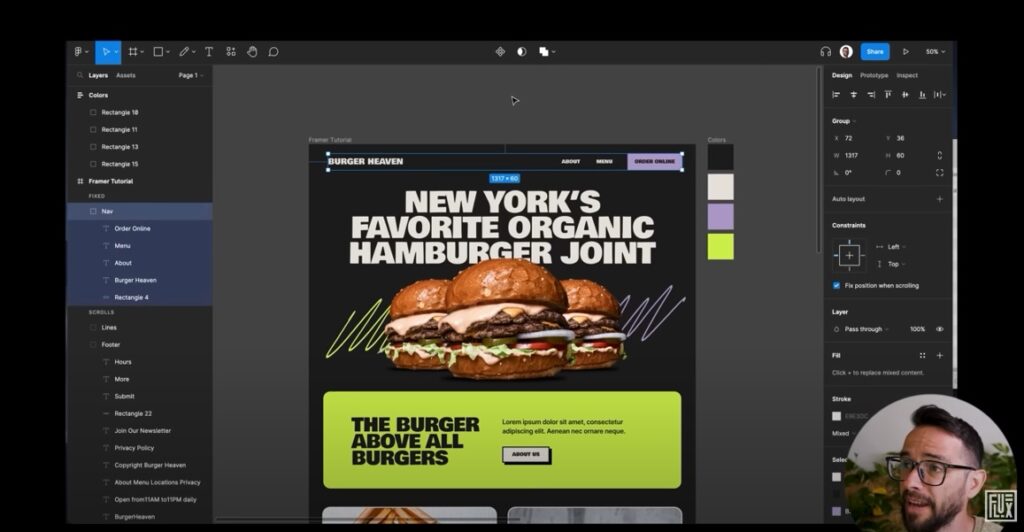
In the world of coding and design, Framer has emerged as a powerful tool that bridges the gap between design and development. Framer is a comprehensive prototyping and interactive design tool that enables designers to bring their creations to life with advanced coding capabilities. This article aims to provide a comprehensive overview of Framer, exploring its features, benefits, and how it empowers designers to create interactive and dynamic user experiences.

What is Framer?

Framer is a versatile design tool that combines visual design capabilities with the power of code. It allows designers to create interactive prototypes and user interfaces using a combination of visual design elements and JavaScript coding. Framer provides a range of features, including an intuitive visual interface, a code editor, design components, animations, and real-time preview options. With Framer, designers can go beyond static mockups and create dynamic and interactive designs that closely resemble the final product.

Key Features of Framer

Framer offers a rich set of features that empower designers to take their designs to the next level. Some key features of Framer include:

a) Visual Interface: Framer provides an intuitive visual interface where designers can create and arrange visual elements with ease.
b) Code Editor: Designers can access and edit the underlying code to customize interactions, animations, and behaviors to achieve the desired effects.
c) Design Components: Framer offers a library of pre-built design components that can be easily customized and reused across multiple projects, saving time and effort.
d) Animations and Interactions: Designers can create fluid animations, transitions, and interactions to simulate user experiences and demonstrate functionality.
e) Real-Time Preview: Framer allows designers to preview their designs in real-time, making it easy to iterate and refine the interactive elements.

Empowering Designers with Coding Capabilities

Framer’s integration of coding capabilities empowers designers by providing them with greater control and flexibility in their design process. By leveraging JavaScript, designers can create complex interactions, implement conditional logic, and manipulate data to create realistic and interactive prototypes. This coding integration enables designers to bridge the gap between design and development, ensuring their vision is accurately translated into the final product.

Benefits of Using Framer

Using Framer offers several advantages for designers:

a) Enhanced Collaboration: Framer facilitates collaboration between designers and developers, as both can work within the same tool and understand the design intent and technical implementation.
b) Realistic Prototyping: Framer allows designers to create prototypes that closely resemble the final product, offering a more accurate representation of the user experience.
c) Efficient Iteration: With Framer’s real-time preview and code editing capabilities, designers can quickly iterate and refine their designs based on user feedback and stakeholder requirements.
d) Seamless Design-Code Handoff: Framer’s ability to generate production-ready code simplifies the handoff process between designers and developers, ensuring smoother implementation and reducing potential misinterpretations.
e) Accessible Learning Curve: Framer provides a range of learning resources, tutorials, and a supportive community, making it accessible for designers of varying coding proficiency levels.

Use Cases for Framer

Framer finds application in various design scenarios, including mobile app design, web design, UI/UX design, and prototyping. It is particularly useful for designers who seek to create highly interactive and engaging user experiences that go beyond the limitations of traditional design tools.

Framer is a powerful design tool that empowers designers to create interactive and dynamic user experiences by combining visual design elements with JavaScript coding. By bridging the gap between design and development, Framer enhances the collaboration between designers and developers, enabling the creation of realistic prototypes and efficient iteration. With its comprehensive features, coding capabilities, and benefits, Framer has become a valuable tool in the toolkit of designers who strive to push the boundaries of design and deliver exceptional user experiences. As the demand for interactive and immersive designs continues to grow, Framer provides designers with the tools they need to bring their visions to life and create impactful digital experiences.

Generated by Chat GPT

Steps To Use Xara Web Designer

Xara Web Designer is a powerful web design software that allows users to create professional-quality websites without the need for coding. Whether you are a beginner or an experienced designer, Xara Web Designer provides an intuitive and user-friendly interface that makes designing websites easy and enjoyable. In this article, we will provide a step-by-step guide on how to use Xara Web Designer to create your own website.

Step 1: Install Xara Web Designer

The first step in using Xara Web Designer is to install the software on your computer. You can purchase and download Xara Web Designer from the official Xara website. Once you have downloaded the software, follow the installation instructions to complete the installation process.

Step 2: Choose a Template

Once you have installed Xara Web Designer, open the software and select “New Document” from the welcome screen. This will bring up a variety of website templates that you can choose from. Browse through the templates and select one that best suits your needs.

Step 3: Customize Your Template

After selecting a template, you can customize it to your liking using the various tools and features provided by Xara Web Designer. For example, you can change the layout of the page, add or remove elements such as text boxes and images, and adjust the color scheme to match your branding.

Step 4: Add Content

Once you have customized your template, it is time to add content to your website. This can include text, images, videos, and other multimedia elements. Xara Web Designer provides a variety of tools for adding and formatting content, making it easy to create engaging and visually appealing web pages.

Step 5: Add Interactivity

One of the strengths of Xara Web Designer is its ability to add interactivity to your website. For example, you can add buttons that link to other pages on your website, create image galleries, and add forms for collecting user information. Xara Web Designer provides an intuitive interface for adding interactivity to your website, making it easy to create engaging and interactive web pages.

Step 6: Preview and Publish Your Website

Once you have created your website, it is important to preview it to make sure everything looks and functions as intended. Xara Web Designer provides a built-in preview function that allows you to preview your website in a variety of formats, including desktop, tablet, and mobile devices. Once you are satisfied with your website, you can publish it to the web using Xara Web Designer’s built-in publishing tools.

Xara Web Designer is a powerful and intuitive web design software that makes it easy for users to create professional-quality websites without the need for coding. By following these six simple steps, you can create your own website using Xara Web Designer and take your online presence to the next level. Whether you are a beginner or an experienced designer, Xara Web Designer provides the tools and features you need to create engaging and visually appealing web pages that showcase your brand and connect with your audience. So why wait? Start using Xara Web Designer today and unleash your creativity on the web!

Can You Code In Elementor?

Elementor is a popular page builder plugin for WordPress that allows users to create custom designs and layouts for their websites without the need for coding. While Elementor is primarily used for visual design and layout, many users wonder if it is possible to code in Elementor. In this article, we will explore this question and provide a comprehensive answer.

1. Elementor’s Limitations

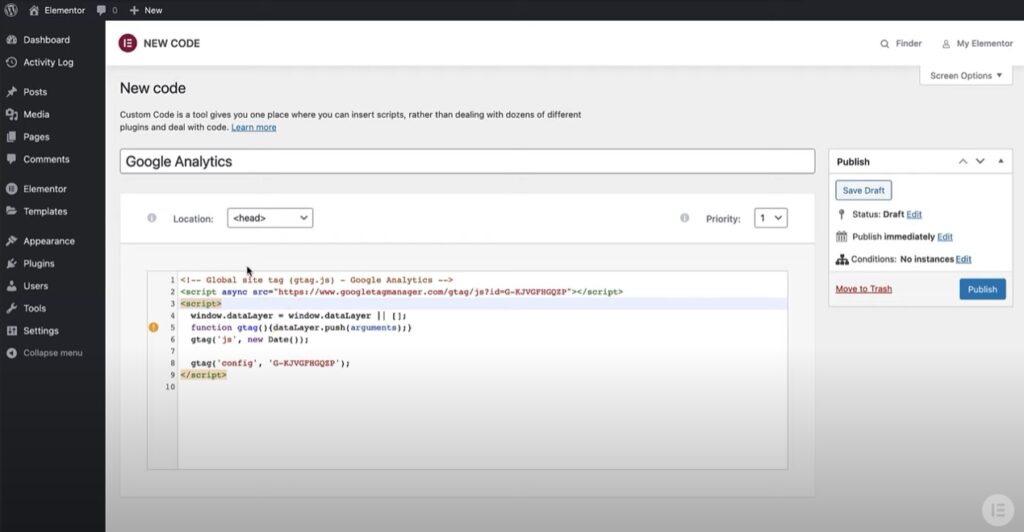
Before we dive into whether or not you can code in Elementor, it is important to understand its limitations. Elementor is a page builder that relies heavily on visual design and drag-and-drop functionality. It is not a full-fledged code editor, and as such, it has limitations when it comes to coding. While Elementor does allow users to add custom CSS and JavaScript, it is not designed for coding complex functionality or building full-scale web applications.

2. Custom CSS in Elementor

One way that users can “code” in Elementor is by adding custom CSS. Elementor provides a built-in CSS editor that allows users to add custom CSS to their designs. This can be useful for making small tweaks to the design or layout, such as adjusting the font size or changing the color of a button. However, it is important to note that custom CSS in Elementor is limited to styling elements on the page, and does not provide the full functionality of a code editor.

3. Custom JavaScript in Elementor

In addition to custom CSS, Elementor also allows users to add custom JavaScript to their designs. This can be useful for adding custom functionality to the page, such as creating a custom slider or adding interactive elements. While Elementor’s custom JavaScript functionality is limited, it can be a powerful tool for adding interactivity and functionality to a page without the need for extensive coding.

4. Coding Beyond Elementor

While Elementor does provide limited functionality for custom CSS and JavaScript, it is not designed for coding beyond these basic elements. For complex functionality and full-scale web applications, it is recommended that users employ a dedicated code editor or integrated development environment (IDE). These tools provide the full functionality of a code editor, including syntax highlighting, code completion, and debugging tools.

5. Using Elementor in Conjunction with a Code Editor

While Elementor is not a full-fledged code editor, it can be used in conjunction with a code editor to create powerful and dynamic web applications. For example, users can use Elementor to create the visual design and layout of a page, and then use a code editor to add custom functionality and interactivity. By combining the power of Elementor with the functionality of a code editor, users can create robust and dynamic web applications without sacrificing the ease of use and visual design capabilities of Elementor.

While Elementor does provide limited functionality for custom CSS and JavaScript, it is not designed for coding beyond these basic elements. For complex functionality and full-scale web applications, it is recommended that users employ a dedicated code editor or IDE. However, Elementor can be a powerful tool for visual design and layout, and can be used in conjunction with a code editor to create powerful and dynamic web applications. By understanding the limitations and capabilities of Elementor, users can create robust and effective web applications that meet their needs and exceed their expectations.

Top 4 Ways Vev Can Help In Coding

Vev is a platform that can be used to create interactive web content without the need for coding. It is designed to simplify the process of web development, making it accessible to users with little or no coding experience. While Vev is primarily used for visual design and prototyping, it can also be a useful tool for coders looking to streamline their workflow and improve the quality of their code. In this article, we will explore how Vev can help in coding, and why it is a valuable tool for developers.

1. Easy Prototyping and Design

One of the primary ways that Vev can help in coding is by simplifying the prototyping and design process. With Vev, users can create interactive web content using a drag-and-drop interface, without the need for any coding knowledge. This can be useful for coders who want to quickly create a prototype or mockup of a website or application before diving into the coding process. By using Vev, coders can save time and effort on designing and prototyping, allowing them to focus more on the coding aspects of their projects.

2. Streamlined Development Process

Another way that Vev can help in coding is by streamlining the development process. Vev allows users to create interactive web content that can be exported to HTML, CSS, and JavaScript code. This means that coders can use Vev as a starting point for their projects, and then refine the code as needed. By using Vev as a foundation, coders can save time and effort on the initial development stages, allowing them to focus on the more complex aspects of coding.

3. Collaboration and Workflow Optimization

Vev can also be a valuable tool for collaboration and workflow optimization. With Vev, multiple users can work on a project simultaneously, making it easier to collaborate on complex projects. Vev also offers a variety of features that can help optimize workflow, such as project management tools, version control, and asset management. By using Vev to manage their projects, coders can save time and effort on project management tasks, and focus more on coding.

4. Code Optimization and Quality Control

Finally, Vev can also help coders optimize their code and ensure its quality. Vev provides users with a variety of tools and features that can help identify and fix issues in their code. For example, Vev’s code editor provides real-time feedback and error checking, making it easier to identify and fix errors in code. Vev also offers a variety of testing and debugging tools that can help users test and optimize their code. By using Vev to optimize their code and ensure its quality, coders can save time and effort on the debugging and testing phases of their projects.

Vev is a platform that can be used to create interactive web content without the need for coding. While it is primarily used for visual design and prototyping, Vev can also be a valuable tool for coders looking to streamline their workflow and improve the quality of their code. By using Vev to simplify the prototyping and design process, streamline development, optimize workflow, and ensure code quality, coders can save time and effort on the initial stages of their projects, and focus more on the more complex aspects of coding.

What Is Iteration X In Coding?

Iteration X is a term used in software development to refer to a specific process that involves repeating a series of steps or tasks in order to improve or refine a software product. It is a common approach used by developers to iterate on code and ensure that it meets the needs of the end-user. In this article, we will explore what iteration X is, why it is important, and how it is used in coding.

1. What is Iteration X?

Iteration X is a software development methodology that emphasizes the importance of iterating on code in order to improve its quality, functionality, and usability. It involves a cyclical process of planning, designing, implementing, testing, and evaluating code, with the goal of identifying and addressing any issues or inefficiencies that may arise.

The X in Iteration X represents the number of iterations that are typically required to refine and improve a piece of code. The exact number of iterations can vary depending on the complexity of the project, the number of stakeholders involved, and the resources available.

2. Why is Iteration X Important?

Iteration X is important for several reasons. First, it allows developers to refine and improve their code over time, resulting in a more robust and reliable software product. By iterating on code, developers can identify and fix issues early on in the development process, before they become major problems that are difficult and expensive to resolve.

Second, iteration X helps to ensure that the software product meets the needs of the end-user. By testing and evaluating the code throughout the development process, developers can gather feedback from stakeholders and make necessary adjustments to ensure that the product is user-friendly and meets the desired requirements.

Finally, iteration X promotes collaboration and communication among developers and stakeholders. By involving all stakeholders in the development process and soliciting feedback at each iteration, developers can ensure that everyone is on the same page and that the end product meets everyone’s expectations.

3. How is Iteration X Used in Coding?

Iteration X is used in coding by breaking down the development process into a series of cyclical steps, with each iteration building on the previous one. The steps involved in iteration X can vary depending on the specific project and development methodology used, but typically include the following:

Planning: This involves identifying the goals and requirements of the project, as well as the resources and timeline needed to complete it.

Design: This involves creating a blueprint or model of the software product, including its functionality, features, and user interface.

Implementation: This involves writing and testing the code for the software product, based on the design and requirements identified in the planning and design stages.

Testing: This involves evaluating the code to ensure that it works as intended, and identifying any issues or bugs that need to be fixed.

Evaluation: This involves gathering feedback from stakeholders and evaluating the software product to identify areas for improvement or refinement.

Once the evaluation stage is complete, the cycle starts again, with each iteration building on the previous one. By repeating this cycle multiple times, developers can refine and improve their code until it meets the desired quality and functionality.

Iteration X is a software development methodology that emphasizes the importance of iterating on code in order to improve its quality, functionality, and usability. It involves a cyclical process of planning, designing, implementing, testing, and evaluating code, with the goal of refining and improving the software product over time. By using iteration X, developers can identify and address issues early on in the development process, ensure that the product meets the needs of the end-user, and promote collaboration and communication among stakeholders.